
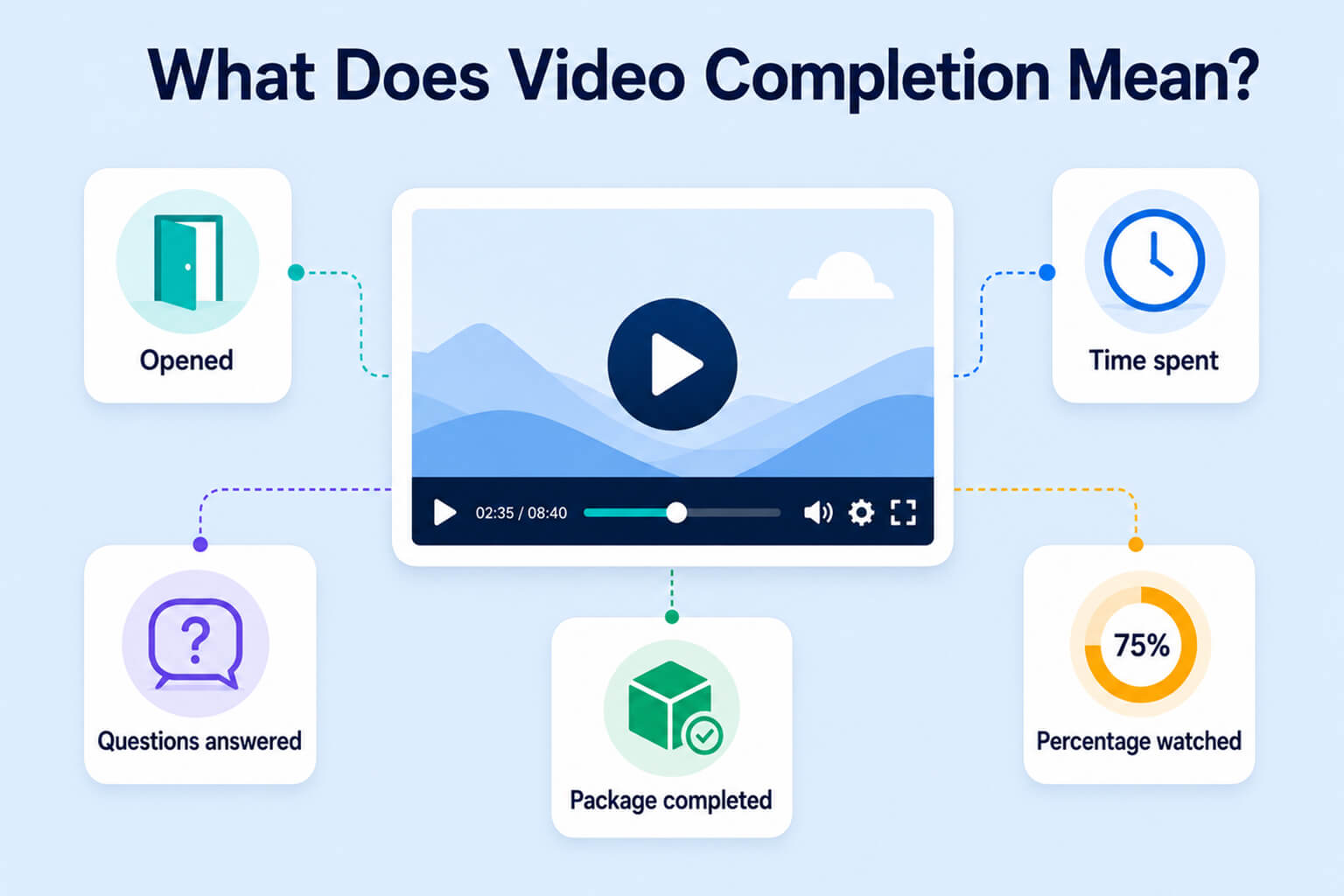
Video is easy to add to a Moodle™ course, but it is not always easy to determine whether a Student actually watched it. There are several ways to track video completion in Moodle, and each method measures something different.
Depending on the course design, video completion might mean that the Student opened a page, spent time in an activity, answered questions, completed a learning package or watched a required percentage of the video.
These conditions do not measure the same thing.
For a broader discussion of the limitations involved, see why Moodle alone may not be enough for video learning.
Moodle provides several ways to build video-based learning, but the right method depends on what you actually need to verify. This guide compares five practical approaches:
- A standard Moodle resource with activity completion
- A Moodle Lesson containing videos
- H5P Interactive Video
- A SCORM package containing video
- A dedicated Moodle video activity
Each method can be useful. The key is understanding what it records, what it does not record, and whether it fits the purpose of your course.
Video completion can mean different things
Before selecting a tool, decide what evidence of completion you need.
Access
The Student opened the resource or activity. This confirms that the content was accessed, but not that the video was played or watched.
Time
The Student spent a specified amount of time within an activity. This is more meaningful than a page view, but an open browser tab does not necessarily indicate continuous attention.
Interaction
The Student answered questions or completed activities associated with the video. This can provide evidence of participation and understanding, particularly when questions are placed throughout the video.
Watch progress
The video player recorded how much of the video timeline the Student watched. This is the most direct measurement of video consumption, but even this cannot prove that the Student paid attention or understood the content.
Moodle activity completion can use criteria such as viewing an activity, receiving a grade or having the Student manually mark it complete. These criteria are valuable for course progression, but the meaning of “complete” depends on the activity and its configuration.
Quick comparison of the five methods
| Method | What Moodle can confirm | Direct watch percentage | Knowledge checks | Seeking control | Setup effort | Best suited for |
|---|---|---|---|---|---|---|
| Standard Page, File or URL | Opened or manually marked complete | No | No | No | Low | Optional and supporting videos |
| Moodle Lesson | End reached, time spent, questions and grade | No | Yes | Usually no | Medium | Guided and branching learning |
| H5P Interactive Video | Interactions, score and H5P attempt completion | Limited or indirect | Strong | Configuration-dependent | Medium | Interactive video learning |
| SCORM package | Status, score and data reported by the package | Package-dependent | Strong | Package-dependent | High | Packaged corporate courses |
| Dedicated video activity | Video progress and completion threshold | Yes | Usually through a linked activity | Supported | Low to medium | Video-driven and compliance courses |
Features can vary by Moodle version, plugin, H5P content type, SCORM authoring tool and video platform. Test the exact completion behavior before using any method for contractual, certification or regulatory requirements.
Method 1: Use a standard Moodle resource with activity completion
The simplest approach is to add a video to a standard Moodle resource.
A Teacher might place the video in:
- A Page resource
- A File resource
- A URL resource
- A Book chapter
- A course section
- The description of another activity
The video may be uploaded to Moodle, embedded from an external platform or added through a direct media URL.
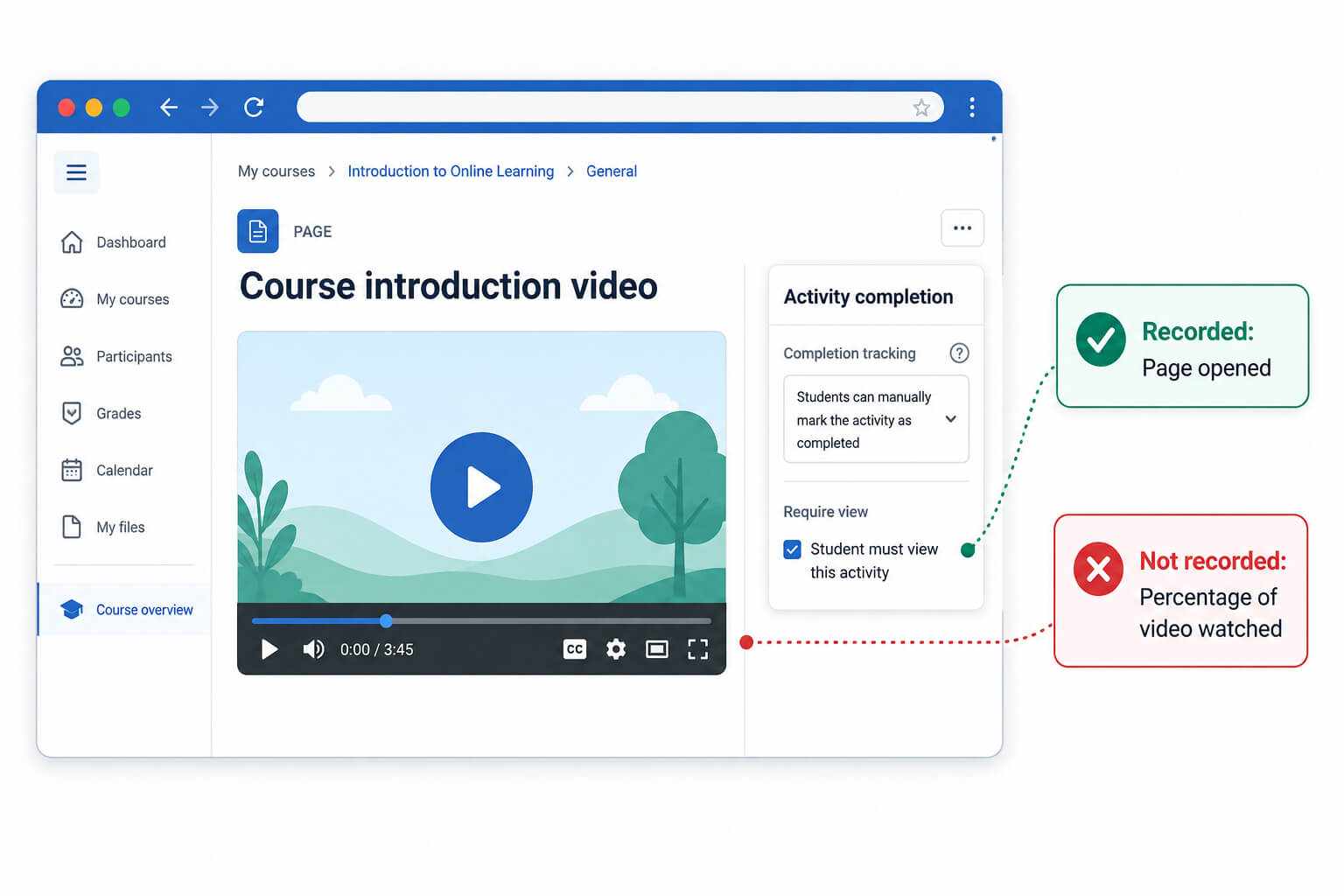
The Teacher can then configure Moodle activity completion. Depending on the resource and its settings, completion might require the Student to view the activity or manually select Mark as done.
What this method measures
This approach normally measures access to the resource, not playback of the video.
For example, if a Page contains a 20-minute video and its completion condition is based on viewing the activity, Moodle marks the Page as complete when the Student opens it. The Student does not necessarily have to play the video or remain on the page for 20 minutes.
Similarly, manual completion records the Student’s confirmation that the task is done. It does not independently verify video progress.
Moodle’s activity completion documentation describes viewing and manual marking as valid completion criteria. The activity completion report then shows which activities have been completed manually or automatically.
Advantages
- Uses standard Moodle functionality
- Requires no additional activity plugin
- Quick for Teachers to configure
- Easy for Students to understand
- Works well for optional or supplementary videos
Limitations
- Does not normally record the percentage watched
- Does not confirm that playback started
- Cannot establish whether the Student skipped parts
- Provides little video-specific engagement data
- Can create a misleading sense that “resource viewed” means “video watched”
Best suited for
Use this method when the objective is to present a video and record that the Student accessed the associated resource.
It is suitable for:
- Introductions
- Optional demonstrations
- Supporting explanations
- Course announcements
- Low-stakes learning materials
It is not sufficient when a course requires evidence that a particular amount of the video was watched.
Method 2: Build a Moodle Lesson around the video
Moodle’s Lesson activity supports content pages, question pages, branching and guided progression.
A video-based Lesson might follow this structure:
- Introduce the topic
- Present a short video
- Ask a comprehension question
- Provide feedback
- Present another video or scenario
- Require the Student to reach the final page
Lesson also supports branching. A Student’s answer can direct them to another page, repeat a concept or move them forward.
What this method measures
Lesson can provide evidence that the Student:
- Reached the final page
- Spent a required amount of time within the Lesson
- Answered questions
- Received a grade
- Achieved a passing grade
Moodle provides Lesson-specific completion conditions for requiring the end of the Lesson to be reached and requiring a minimum amount of time within Lesson pages.
These conditions can be useful, but they should not be confused with direct video tracking.
A Student can spend ten minutes inside a Lesson without watching ten minutes of video. Similarly, reaching the final page confirms navigation through the Lesson, not necessarily continuous playback of every video.
Advantages
- Available as a standard Moodle activity
- Supports structured progression
- Includes questions and grading
- Allows branching and remedial paths
- Can combine videos with explanations and decisions
- Provides stronger learning evidence than a simple page view
Limitations
- Does not directly measure watched portions of the video
- Time in the Lesson is not the same as playback time
- Can take longer to design and maintain
- May be unnecessarily complex for a single video
- Reporting focuses on Lesson progress and responses rather than video behavior
- Updating the learning sequence may require editing multiple pages and branches
Best suited for
Lesson is a good choice when the video belongs within a guided learning journey.
It works particularly well for:
- Scenario-based learning
- Decision-making exercises
- Videos followed by comprehension questions
- Remedial learning paths
- Guided tutorials
- Courses where reaching an outcome matters more than measuring the video timeline
A Lesson is therefore better at confirming progression and participation than confirming an exact watch percentage.
Method 3: Create an H5P Interactive Video
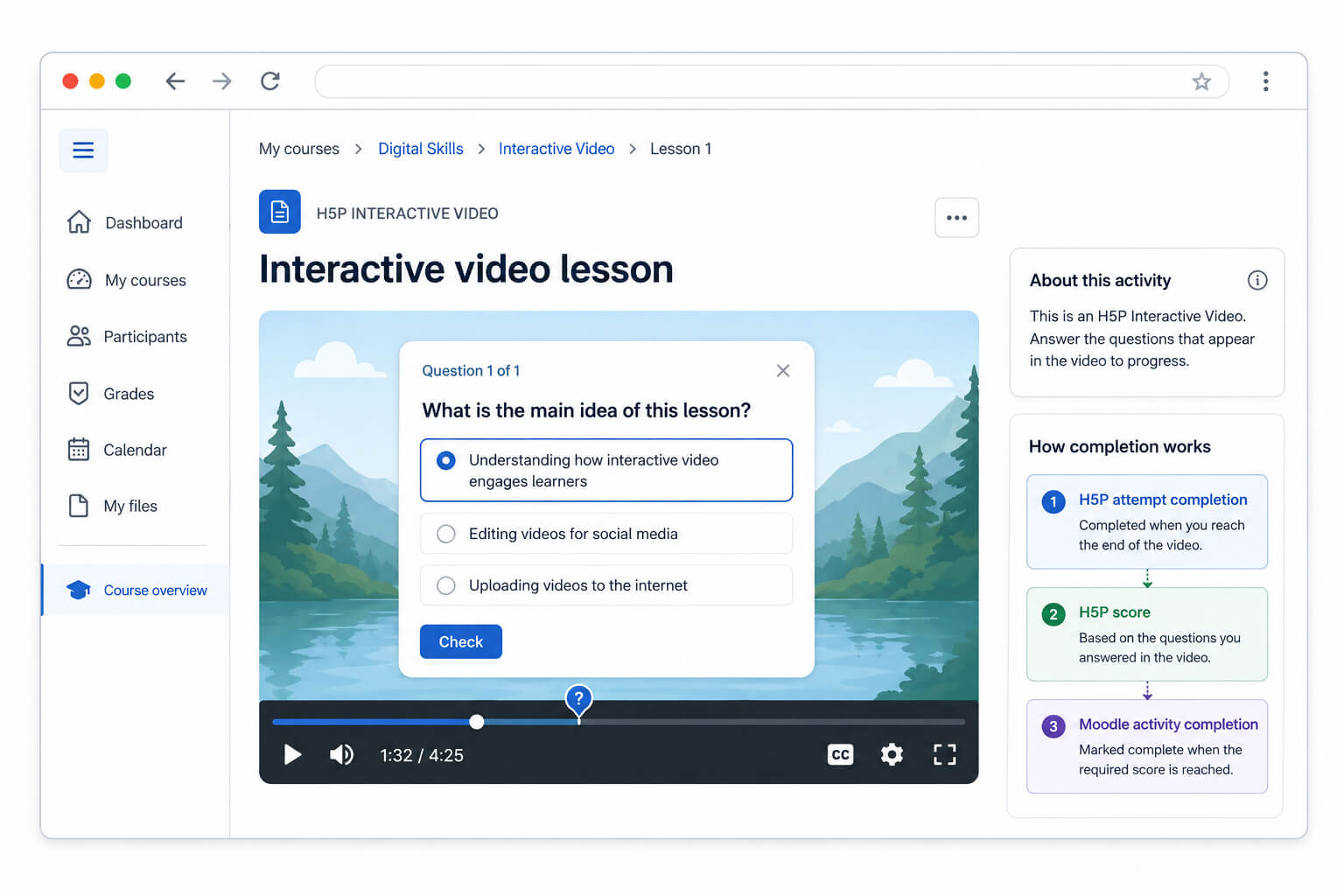
H5P Interactive Video allows Teachers to add interactions at specific points in a video.
These can include:
- Multiple-choice questions
- True-or-false questions
- Fill-in-the-blank exercises
- Summaries
- Images
- Explanatory text
- Links
- Navigation points
Instead of asking the Student to watch passively, H5P can pause or supplement the video with activities that require a response.
Moodle’s documentation explains how an H5P activity records attempts, scores and content-related completion data.
What this method measures
H5P is particularly useful for recording interactions, attempts and scores.
Moodle’s H5P attempts report can indicate whether a Student went through the H5P content to the end. However, Moodle notes that the completion information shown in the H5P attempts report is based on H5P content data and is separate from Moodle’s activity-completion and grade-to-pass settings.
This creates several related but distinct concepts:
- Reaching the end of the H5P content
- Completing embedded interactions
- Receiving an H5P score
- Achieving Moodle’s grade-to-pass threshold
- Meeting Moodle’s activity-completion conditions
Teachers should test how these work together before deploying the activity across a course.
Advantages
- Makes video learning active rather than passive
- Places questions at relevant moments
- Provides immediate feedback
- Can assess understanding during playback
- Supports graded interactions
- Works well for formative learning
- Can reduce the separation between instruction and assessment
Limitations
- Requires Teachers to create and maintain interactions
- Completion may depend on answering or submitting interactions rather than simply watching
- The relationship between H5P completion, score and Moodle completion can be confusing
- Updating the underlying video may shift interaction timestamps
- It may be excessive when the requirement is only to track viewing progress
- It does not always provide a simple answer to “Did this Student watch at least 90%?”
Best suited for
Use H5P when the primary goal is to make the Student think, respond and receive feedback while watching.
It is particularly appropriate for:
- Interactive tutorials
- Concept checks
- Language learning
- Product training
- Demonstration videos
- Formative assessment
- Videos that contain several distinct learning points
H5P is often the strongest option when interaction and understanding matter more than obtaining a single watch-percentage value.
Method 4: Package the video as SCORM content
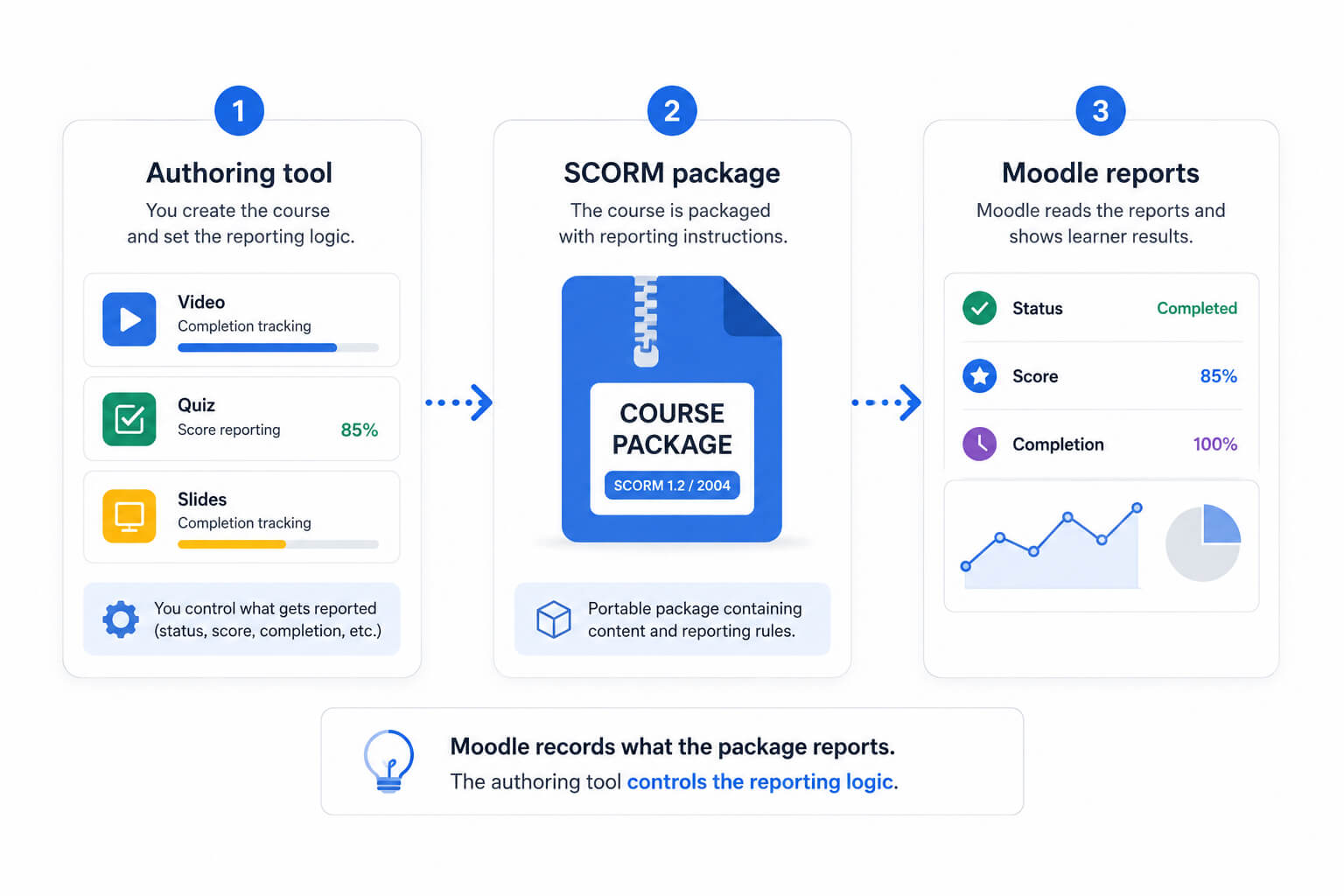
SCORM allows learning content created in an external authoring tool to communicate status and results back to Moodle.
A SCORM package may contain:
- Videos
- Slides
- Narration
- Questions
- Simulations
- Navigation controls
- Branching
- Final assessments
The package is created outside Moodle and uploaded as a SCORM activity.
What this method measures
SCORM can report information such as:
- Completion status
- Pass or fail status
- Score
- Time
- Question responses
- Progress through learning objects
The exact data depends on how the package was authored.
For SCORM 1.2 packages, Moodle considers an attempt complete when the package sets its lesson status to completed or passed. Moodle receives the status, but the package is responsible for sending it correctly.
Moodle’s SCORM settings documentation explains how completion depends on the status communicated by the package.
A package might therefore mark completion when the Student:
- Reaches the final slide
- Watches a required video
- Spends a specified amount of time
- Passes a quiz
- Completes every interaction
The meaning of completion must be verified within the authoring tool and the published package.
Advantages
- Suitable for complex packaged courses
- Supports scores and completion statuses
- Can include rich interactions and simulations
- Offers portability between compatible learning systems
- Works well with existing corporate content libraries
- Can combine video, assessment and branching in one module
Limitations
- Requires an external authoring tool
- Completion depends on the package’s implementation
- Updating a video may require republishing the package
- Troubleshooting may involve both Moodle and the authoring environment
- Packages can behave like a black box inside Moodle
- Accessibility and mobile behavior depend partly on the authoring tool
- “Package completed” does not automatically mean “video watched”
Best suited for
SCORM remains useful when an organization already has an established content-production process or needs to distribute packaged modules.
It is well suited to:
- Corporate training libraries
- Vendor-provided courses
- Formal assessments
- Portable learning modules
- Courses created by instructional-design teams
- Content containing videos, simulations and graded interactions
SCORM can provide strong completion tracking, but only when the package is deliberately authored to connect the required video behavior with its reported completion status.
Method 5: Use a dedicated Moodle video activity
A dedicated video activity treats the video itself as a course activity.
Rather than placing the video inside a generic resource, interactive package or multi-page Lesson, the Teacher creates a Video Lesson directly from Moodle’s activity chooser. This allows completion conditions to be connected to video-player progress.
See how Video Lesson Activity enables structured video learning in Moodle.
Depending on the plugin, a dedicated activity may support:
- Required watch percentage
- Playback-progress tracking
- Resume from the last watched position
- Forward-seeking restrictions
- Rewinding while preventing forward skipping
- Video-specific Student reports
- Engagement analytics
- Completion linked to Moodle Restrict access
- Completion linked to course completion
MooPlugins’ Video Lesson Activity, for example, supports percentage-based completion, seeking controls, a VideoJS-based player and Student-level video engagement reporting.
Its administrative controls can also define default completion percentages, apply site-wide seeking behavior and automatically restrict seeking when a high completion threshold is used.
What this method measures
A dedicated activity can record video-specific events such as:
- How much of the timeline was watched
- Whether the required percentage was reached
- The Student’s last playback position
- Whether completion conditions were met
- Individual Student progress
- Aggregate engagement with the video
This makes it the most direct of the five methods when “completion” specifically means watching a defined portion of the video.
Once the activity is complete, Moodle’s existing completion and Restrict access systems can be used to support progression through the course. Activity completion can be connected to course progress and can be used as a condition for accessing later materials.
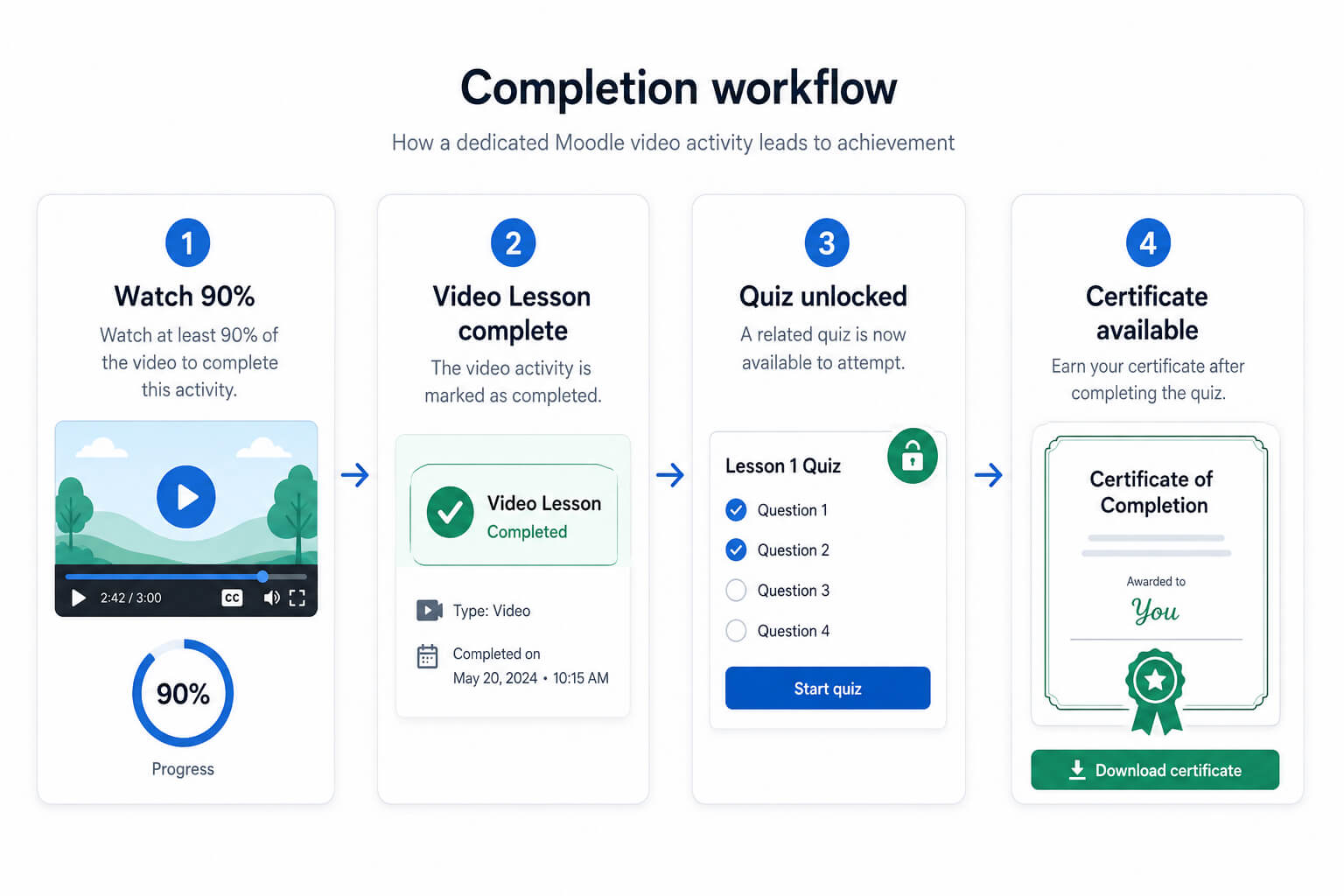
For example:
- The Student must watch 90% of a safety video.
- Moodle marks the Video Lesson complete.
- A quiz becomes available.
- The Student must pass the quiz.
- A certificate or next course section is unlocked.
Advantages
- Measures progress at the video-player level
- Provides a direct watch-percentage condition
- Fits Moodle’s normal activity workflow
- Can support resume playback
- May provide Student-level video reports
- Can be combined with Restrict access
- Does not require building an entire interactive package
- Suitable for reusable, structured video lessons
Limitations
- Requires an additional plugin
- Some solutions may require licensing or hosting
- Video storage and delivery still need to be planned
- Watch percentage still does not prove attention or understanding
Best suited for
A dedicated activity is most appropriate when video progress is itself a formal course requirement.
Common use cases include:
- Compliance training
- Employee onboarding
- Safety instruction
- Mandatory policy videos
- Certification preparation
- Video-first courses
- Courses that need Student-level watch reports
- Courses that unlock assessments after required viewing
Video Lesson Activity also supports centralized video management and flexible video sources. Organizations can use their own AWS-based infrastructure or optional managed video hosting, depending on their technical and operational requirements.
Which method should you use to track video completion in Moodle?
The best way to track video completion in Moodle depends on what you want completion to represent.
Use a standard Moodle resource when access is enough
Choose a Page, File or URL when the video is optional, supplementary or low stakes.
This is the simplest approach, but completion should be described as resource access rather than verified viewing.
Use Moodle Lesson when you need guided progression
Choose Lesson when Students must move through a structured sequence, make decisions or answer questions after viewing content.
Lesson is particularly useful when the video is one part of a larger guided experience.
Use H5P when interaction matters
Choose H5P Interactive Video when you want to pause passive viewing and ask Students to respond throughout the video.
This is often the best option for formative assessment and active learning.
Use SCORM when you already create packaged courses
Choose SCORM when your organization uses an external authoring tool, has an existing package library or needs to combine videos, slides, simulations and assessments.
Verify what the package reports before treating its status as evidence of video completion.
Use a dedicated video activity when watch progress matters
Choose a dedicated video activity when the course needs to measure the video timeline itself.
This is the most direct option for requirements such as:
- Watch at least 80% or 90%
- Prevent skipping forward
- Resume from the last position
- Review individual video progress
- Unlock the next activity after required viewing
Watching is not the same as learning
No tracking method can prove attention with complete certainty.
A Student might allow a video to play while focusing elsewhere. Preventing forward seeking does not necessarily improve understanding, and requiring 100% completion may create unnecessary friction without improving learning outcomes.
For higher-stakes courses, combine video tracking with evidence of understanding.
Useful follow-up activities include:
- A short quiz
- A scenario-based question
- A written reflection
- A practical assignment
- A confirmation or attestation
- Teacher review
- A discussion contribution
For example, a compliance course might require the Student to watch 90% of a video and then pass a quiz. The watch condition confirms exposure to the material, while the quiz provides evidence that the Student understood its key points.
Seeking restrictions should also be applied selectively. They may be appropriate for mandatory first-time viewing, but Students should ideally be able to revisit and review specific sections later.
Frequently asked questions
Can Moodle track whether a Student watched a complete video?
Moodle’s standard Page, File and URL resources generally track access or manual completion rather than the percentage of a video watched.
Direct watch-percentage tracking normally requires a video-specific activity, an appropriately configured interactive tool or a package designed to report that information.
Does “Student must view this activity” mean the video was watched?
No. It normally means that the Student opened the activity or resource.
It does not by itself confirm that the Student played the video, remained on the page or watched the complete timeline.
Can H5P track video completion?
H5P Interactive Video can record attempts, interactions, scores and whether the Student went through the H5P content to the end.
However, H5P attempt completion, H5P scoring and Moodle activity completion are related but separate concepts. Test the complete workflow for the specific H5P content before relying on it.
Can Moodle Lesson verify that a video was watched?
Lesson can require the Student to reach the end, spend a minimum amount of time and answer questions.
These conditions provide evidence of progression and participation, but they do not normally measure the watched portions of the video timeline.
Can SCORM prevent Students from skipping a video?
It depends on the package and authoring tool.
Moodle records the status and data communicated by the SCORM package. Any video-navigation restrictions and completion rules must be implemented correctly within that package.
What is the best method for compliance training?
For compliance training, consider combining:
- Direct video-progress tracking
- An appropriate completion threshold
- Seeking controls where justified
- A graded knowledge check
- Moodle activity and course completion
- Clear reporting and record-retention procedures
A watch condition alone establishes exposure more effectively than it establishes understanding.
Can video completion unlock a quiz or certificate?
Yes. When the chosen method updates Moodle activity completion correctly, Restrict access can use that completion status to control access to later activities or course sections.
A quiz, assignment or certificate activity can therefore remain unavailable until the video-related condition has been met.
Conclusion
There is no single method to track video completion in Moodle because different tools record different kinds of evidence.
A standard resource may be enough when you only need to know that the Student opened the material. Moodle Lesson can create a guided sequence, while H5P can turn the video into an interactive learning experience. SCORM remains useful for externally authored and packaged courses.
When the requirement is to measure the video itself—such as watching a minimum percentage, resuming playback or controlling forward seeking—a dedicated video activity offers the most direct approach.
The right question is not simply:
“How can Moodle mark this video complete?”
It is:
“What evidence of completion does this course actually need?”
Once that is clear, you can choose the method that provides the right balance of reliability, learning design, reporting and administrative effort.
To explore percentage-based completion, seeking controls and Student-level video reporting inside Moodle, see the MooPlugins Video Lesson Activity.
Table of Contents
Want to Make Your Moodle Site Better?
Supercharge your Moodle site with plugins and fixes that boost engagement, usability, and admin efficiency — all designed to work natively inside Moodle.
Get updates, fixes, and best practices right in your inbox.