
This article explains how video completion rules work in the Video Lesson Activity and how they extend Moodle’s standard activity completion rule.
How Video Lesson extends Moodle completion #
The Video Lesson Activity builds on Moodle’s standard completion system by adding video-specific completion logic.
In addition to Moodle’s default options, Video Lesson introduces:
- Watch-progress–based completion
- Optional enforcement of minimum watch percentage
- Completion that reflects actual viewing, not just page access
This makes video completion meaningful and enforceable.
Video Lesson–completion rules #
View the activity
This is a core Moodle option.
- Completion is marked when the learner opens the activity page
- Moodle does not check video playback
Require watch progress (%) #
This option is unique to the Video Lesson Activity.
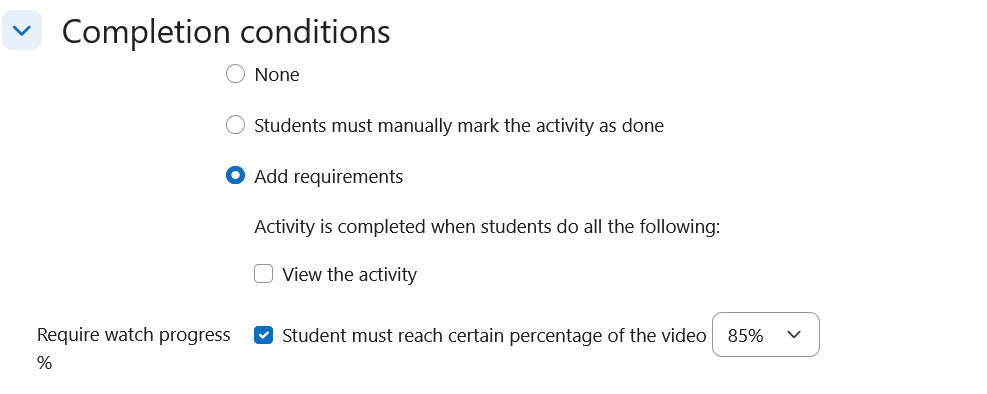
When enabled:
- Learners must watch a defined percentage of the video
- Completion is based on actual playback progress
- Example: Student must reach 85% of the video
Only when the required percentage is reached will the activity be marked complete.
How watch percentage is calculated #
Watch progress is calculated based on:
- Actual playback time
- Video duration
- Continuous tracking during playback
Important notes:
- Simply opening the activity does not count
- Seeking ahead does not increase progress
- Completion is triggered only after the threshold is reached
Recommended configuration (most cases) #
- Enable Require watch progress
- Do not rely solely on View the activity
This ensures completion reflects meaningful engagement.
What happens when completion is achieved? #
Once the required watch percentage is reached:
- The activity is marked complete in Moodle
- Course progress updates
- Dependent activities (quizzes, certificates, lessons) can unlock
- Completion appears in reports and dashboards
Common use cases #
Video completion rules are commonly used for:
- Compliance training
- Certification programs
- Mandatory onboarding videos
- CPD and regulatory learning
- Structured, video-first courses
Important limitations to understand #
- Completion is tracked per Video Lesson activity
- Completion depends on video playback data
- External video sources (e.g. YouTube, Vimeo) may have limitations based on provider behavior
Note on site-wide completion enforcement #
Site administrators may configure global settings that automatically enforce certain behaviors (such as disabling seeking) when high completion percentages are required.
If completion behavior appears stricter than expected, check the Video Lesson global settings.

