
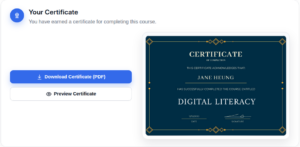
Course Completion Page can show an issued course certificate as part of the Student’s completion experience. The plugin currently supports Custom certificate mod_customcert.
When does the certificate section appear? #
The certificate section is shown only when:
- The Certificates section is enabled for the course
- The Student has an issued certificate from
mod_customcert - The certificate is available for that completed course
If any of these conditions are not met, the certificate section is omitted from the completion page.
What can Students do with the certificate? #
When an issued certificate is available, Students can:
- Preview Certificate – Opens the certificate so the Student can view it before downloading.
- Download Certificate – Downloads the issued certificate as a PDF.
The Course Completion Page does not generate a separate certificate. It displays the certificate already issued by the supported Moodle certificate activity.
Why is the certificate section not showing? #
The section may be hidden when:
mod_customcertis not installed or enabled- The certificate section is disabled
- The course does not contain a supported certificate
- The Student has not been issued a certificate
- The certificate is not available for that Student
Because Course Completion Page only displays available information, it does not show an empty certificate section.

